

An apron cover needs more than occasional wiping: chips can lodge beneath slats, coolant can damage joints and fabric, and misalignment can overload the moving assembly. A clear inspection schedule and cleaning method will help you identify wear early, keep the cover moving freely, and decide when a part needs adjustment, repair, or replacement.
Key takeaways
- Inspect each shift when chip load, coolant and travel cycles are high.
- Remove debris without driving chips into hinges, fabric or guideways.
- Check slats, wipers, fabric and fasteners for damage before operation.
- Test full travel for binding, rubbing and alignment faults.
Set inspection intervals around the machine’s real duty cycle
Inspect an apron cover according to chip load, coolant exposure and travel cycles, not a calendar alone. High-production machines need a visual check each shift; less demanding installations can use a weekly check plus a documented monthly inspection.
- Each shift: look for accumulated chips, dried coolant, oil, abrasive dust, torn or flattened wipers, gaps and visible slat damage.
- Weekly: move the cover through its complete stroke and check for sticking, hesitation, scraping, uneven rolling, unusual noise or increased drive force.
- Monthly: inspect fasteners, overlaps, guides, rollers, edge seals and mounting points; record the findings against the machine axis.
- After a crash, heavy chip load or abnormal motion: stop operation, isolate hazardous energy against unexpected start-up, and inspect before personnel enter the cover area or restart the machine.
A cover that still moves can have worn wipers, brushes or edge seals that let coolant and chips reach the machine way. Record the cover identity, axis, date, symptoms, chip or coolant conditions, damaged parts and corrective action; “cover cleaned” will not reveal progressive deterioration.
Lubricate hinges, rollers or guides only where the manufacturer specifies it. Excess grease traps abrasive chips, while dry-running designs can be damaged by unnecessary lubricant. Stop using the cover when movement changes until you identify the cause.
Clean slats, hinges, fabric and guideways without forcing debris inside
Clean an apron cover with the machine isolated from hazardous motion and unexpected start-up. Stopping the axis at the control panel is not enough; apply the machine’s energy-control procedure before reaching beneath the cover or removing it.
1. Remove loose chips with a soft brush, working from the exposed surface toward an accessible edge. Brush the underside, hinge pockets and guideways as well as the top; packed chips increase resistance and can bend slats or overload the drive.
Use compressed air only at low pressure and direct it away from seals, bearings and joints, never into them.
2. Wipe dried coolant and oil with a lint-free cloth dampened with mild detergent solution. Clean fabric gently on both faces without stretching or scraping it, then remove residue with a clean damp cloth and allow it to dry. Do not use sharp tools, solvent, high-pressure washing or abrasive pads.
3. Move the cover through its complete stroke only after cleaning and only when movement is safe. Stop if it sticks, hesitates, scrapes, rolls unevenly or needs more drive force; hidden slat or guideway damage may be present.
Do not release springs, take-up devices or roller tension during cleaning. Treat adjustment or disassembly as specialist repair because stored energy can cause sudden retraction. Apply lubricant only to manufacturer-specified points; excess oil or grease traps abrasive chips. Record the cover, axis, condition found and corrective action, not merely “cover cleaned.”
Check slats, fabric, wipers and mounting hardware for specific damage
These checks are core apron cover maintenance requirements: inspect the complete travel path, not only the exposed end. Move the cover through its full stroke and watch for sticking, hesitation, scraping, uneven rolling, unusual noise or increased drive force. Stop operation and identify the cause even when no slat appears broken.
- Check slats for bends, cracks, sharp edges, loose rivets, distorted overlaps and gaps that expose the machine way.
- Check hinge pins or links for looseness, binding and missing hardware.
- Check guide channels and rollers for damage, misalignment, rough rotation and chip-packed clearances.
- Check end brackets, mounting hardware and the connection to the moving axis for looseness, shifting or pulled fasteners.
- Check wipers, brushes and edge seals for hardening, tears, flattening, gaps and loss of contact. The cover can still move while a worn wiper lets coolant and chips reach the protected area.
| Part | Sound condition | Failure sign requiring correction |
|---|---|---|
| Slats and hinges | Straight, secure and overlapping | Crack, bend, sharp edge, loose joint or exposed way |
| Wipers and seals | Flexible, continuous contact | Tear, hardening, flattened edge or visible gap |
| Guides and rollers | Aligned, smooth and quiet | Scraping, uneven travel, wobble or abnormal noise |
| Mounts and axis connection | Tight and correctly aligned | Movement, vibration, distorted bracket or loose fastener |
Record the cover identification, machine axis, date, symptoms, damaged parts, chip or coolant conditions and corrective action; “cover cleaned” cannot reveal progressive deterioration. Apply lubricant only at specified points, because excess grease retains abrasive chips. Isolate hazardous motion and unexpected start-up before removing the cover or entering its area.
Test the complete travel path for binding, rubbing and alignment faults
An apron cover is operating correctly when it travels smoothly through its complete stroke without binding, hesitation, scraping, uneven rolling or unusual noise. A change in the drive force needed to move it is also a fault, even when the slats look undamaged.
Check the complete travel path for these conditions:
- Run the cover from fully closed to fully open and back, watching for a fault at either end of travel.
- Check the slats, hinge pins or links, end brackets, guide channels, rollers and mounting hardware for rubbing, looseness or misalignment.
- Confirm that the cover stays connected to the moving axis and does not lift, twist or develop a gap that exposes the machine way.
- Stop operation if travel becomes stiff, jerky or noisy. Find the cause before returning the machine to service.
- Replace a bent, cracked, heavily dented or misaligned slat instead of straightening it in place; altered geometry creates high spots that bind repeatedly.
Record the cover identification, machine axis, inspection date, operating symptoms, damaged parts, chip or coolant conditions and corrective action. “Cover cleaned” does not show progressive deterioration.
If repair requires removing the cover or entering its travel area, isolate hazardous motion and unexpected start-up under the machine’s energy-control procedure; stopping the axis at the control panel is not enough.
Follow the manufacturer’s apron cover maintenance requirements for lubrication: apply lubricant only to specified points, because grease or oil on dry-running surfaces can hold abrasive chips.
Repair or replace damaged parts before they overload the machine
Adjust, repair or replace an apron cover when it sticks, hesitates, scrapes, rolls unevenly, becomes unusually noisy or needs more drive force. Stop the machine if the cause is unclear; continued travel can turn a bent strip, worn wiper or loose mounting into a jam and overload the axis.
- Isolate hazardous motion and unexpected start-up before removing the cover or entering its travel area. Stopping the axis at the control panel is not enough; follow your machine-energy-control procedure.
- Replace wipers, brushes and edge seals when they are hard, torn, flattened, gapped or no longer contacting the protected surface. A cover can still move while these wear parts let chips and coolant reach the guideway.
- Treat spring, take-up and retracting-mechanism adjustment as specialist work. Stored tension can cause sudden retraction or uncontrolled movement when released without the manufacturer’s procedure.
- Lubricate only named hinge, roller or guide points at the stated interval. Do not grease dry-running materials or leave oil where it can trap abrasive chips.
- After a crash, heavy chip load or repair, run the cover through its complete stroke and confirm smooth travel before returning the axis to service. The cover maker, including SCUTES INDIA PRIVATE LIMITED when it supplied the unit, can provide the correct adjustment and replacement procedure.
Record the cover identification, machine axis, date, operating symptoms, damaged parts, coolant or chip conditions and corrective action. Note the parts replaced, adjustment made and post-repair travel result; “cover cleaned” alone cannot reveal progressive slat, wiper, alignment or mounting deterioration. These are core apron cover maintenance requirements.
Related product
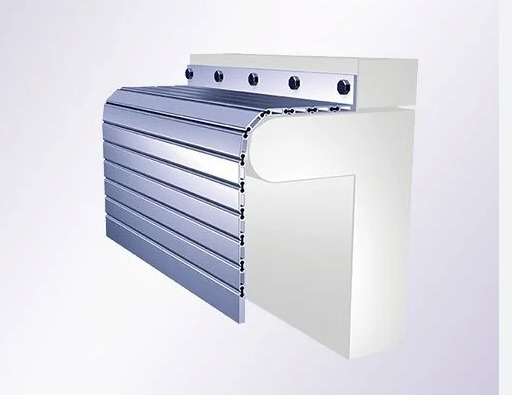 | APRON COVER Effectively engaged in offering a vast collection of outstanding quality products which include Apron Covers. View product → |
Frequently asked questions
How often should you inspect an apron cover?
Match inspections to the machine’s real duty cycle. High-production machines need a visual check each shift; less demanding installations can use a weekly check plus a documented monthly inspection.
How should you clean an apron cover?
Clean slats, hinges, fabric and guideways without forcing chips or other debris into joints, seals or moving parts.
What damage should you check on an apron cover?
Inspect slats, fabric, wipers and mounting hardware for cracks, tears, distortion, worn sealing surfaces, loose fasteners and other damage.
How do you test an apron cover after maintenance?
Run the complete travel path and check for binding, rubbing, restricted movement and alignment faults. Repair or replace damaged parts before they overload the machine.